
Claude Code Multi-Agent Skill
Build your AI dev team from a project description
Describe what you’re building. Get an orchestrator, specialist agents, a self-healing execution pipeline, and a project brain that Claude reads every session — all generated from a single conversation.
What This Skill Does
This Claude Code multi-agent skill turns a project description into a complete agent team configuration. You describe your stack, your domain, and the hard parts. The skill generates everything Claude Code needs to coordinate multiple agents on your project — routing rules, agent definitions, orchestration config, and a CLAUDE.md that loads your full context automatically.
No frameworks. No external services. Plain markdown files in your repo’s .claude/ directory.
How I Work — process and principles behind how I build tools like this
The Problem with Multi-Agent Setups
Setting up multiple agents in Claude Code by hand means solving the same problems every session.
Without this skill:
- You re-explain your project every time Claude Code starts a new session
- You manually coordinate which agent handles which task
- Failed tasks halt the entire run until you step in
- Context is lost between sessions — no memory, no continuity
- Generic agent descriptions route tasks to the wrong specialist
With this skill:
- CLAUDE.md loads your full project context on every session start
- Routing rules assign tasks to the right agent based on your actual stack
- A self-healing pipeline retries, rewrites, and splits failed tasks automatically
- State reconciliation syncs progress across interrupted sessions
- Every agent description names your real technologies and domain — no placeholders
The difference is setup time and reliability. Instead of spending the first ten minutes of each session re-orienting Claude, you start where you left off.
How It Works
Four steps. From a project description to autonomous execution.
Describe
Tell Claude Code what you’re building, your tech stack, and the parts that are difficult. You can paste everything at once or answer guided questions.
Generate
The builder creates your .claude/ directory — agents, skills, CLAUDE.md, and orchestration config. Every file is specific to your project.
Plan
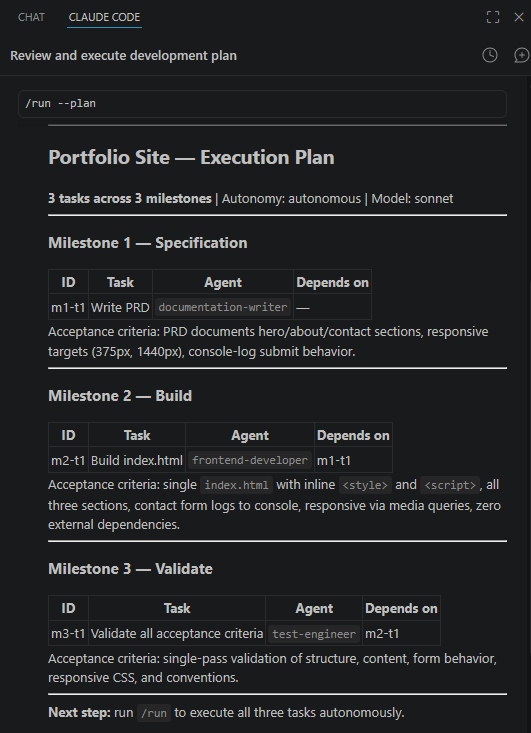
Run /run --plan to see the task decomposition before anything executes. Review it. Adjust if needed.
Execute
Run /run. The orchestrator assigns tasks, validates results, and self-heals failures. Monitor with /status or the visual dashboard.
Each step is visible. Nothing runs without your review unless you choose full autonomy.
What Gets Generated
The skill produces a complete .claude/ directory inside your project:
your-project/
└── .claude/
├── CLAUDE.md ← project brain, read every session
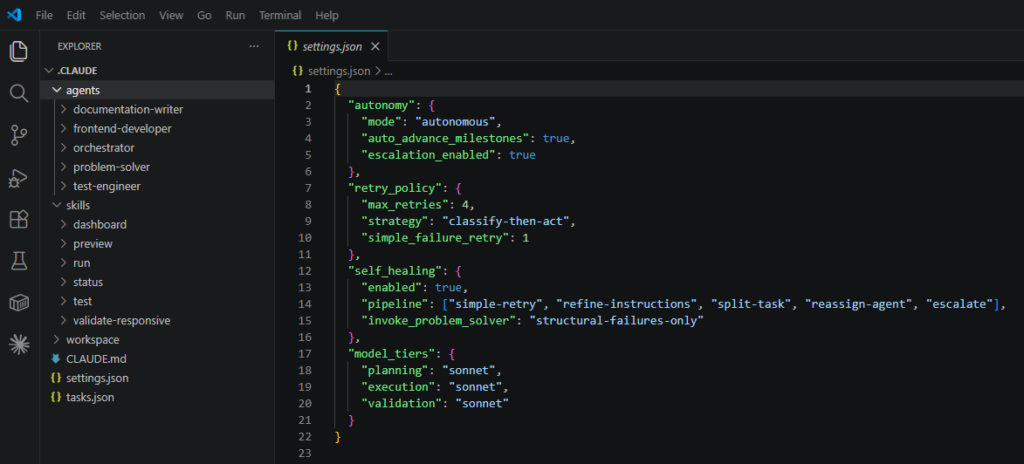
├── settings.json ← autonomy, retry policy, model tiers
├── agents/
│ ├── orchestrator/AGENT.md ← plans, assigns, validates, loops
│ ├── problem-solver/AGENT.md ← self-healing, task repair
│ ├── test-engineer/AGENT.md ← mandatory quality gate
│ ├── documentation-writer/AGENT.md ← PRDs before development
│ └── [project-specific]/AGENT.md
├── skills/
│ ├── run/SKILL.md ← autonomous execution loop
│ ├── status/SKILL.md ← project state reporting
│ ├── dashboard/SKILL.md ← visual progress tracker
│ ├── deploy/SKILL.md
│ ├── test/SKILL.md
│ ├── review/SKILL.md
│ └── [domain skills]/SKILL.md
└── workspace/ ← result files, state, progress log, dashboard
Everything is plain markdown
No external services, no databases, no cloud dependencies. Claude Code reads the directory at every session start.
Four agents are mandatory on every project: the orchestrator, problem-solver, test engineer, and documentation writer. Additional agents are added based on your stack — see the table below.
After generation, you own the output. Edit anything. Add agents, modify skills, update conventions. The builder gets you started. You take it from there.
What Makes It Different
This isn’t a generic multi-agent framework. It’s repo-local, Claude Code-native, and deterministic.
Self-healing pipeline
Failed tasks are classified as simple or structural. Simple failures retry with a hint. Structural failures invoke the problem-solver agent to rewrite, split, or reassign the task. The pipeline doesn’t stop on errors — it adapts.
State reconciliation
Every session starts by syncing tasks.json, workspace results, and orchestrator memory. If a session is interrupted, the next one picks up where it left off. No manual state recovery.
Three autonomy modes
Supervised pauses at milestones for your review. Autonomous advances when defined criteria pass. Strict-autonomous handles everything without interruption. Choose the level of control that fits the task.
Token optimization
State summarisation keeps context usage linear as projects grow. Tiered model assignment runs planning on Opus and validation on Haiku. Right-sized task decomposition prevents token waste on over-granular steps.
Project-specific agents
Every agent description names your actual technologies and domain. A payments engineer for a SaaS project references Stripe and your billing model — not a generic “handles payments” placeholder. Routing accuracy depends on specificity. This skill delivers it.
Visual dashboard
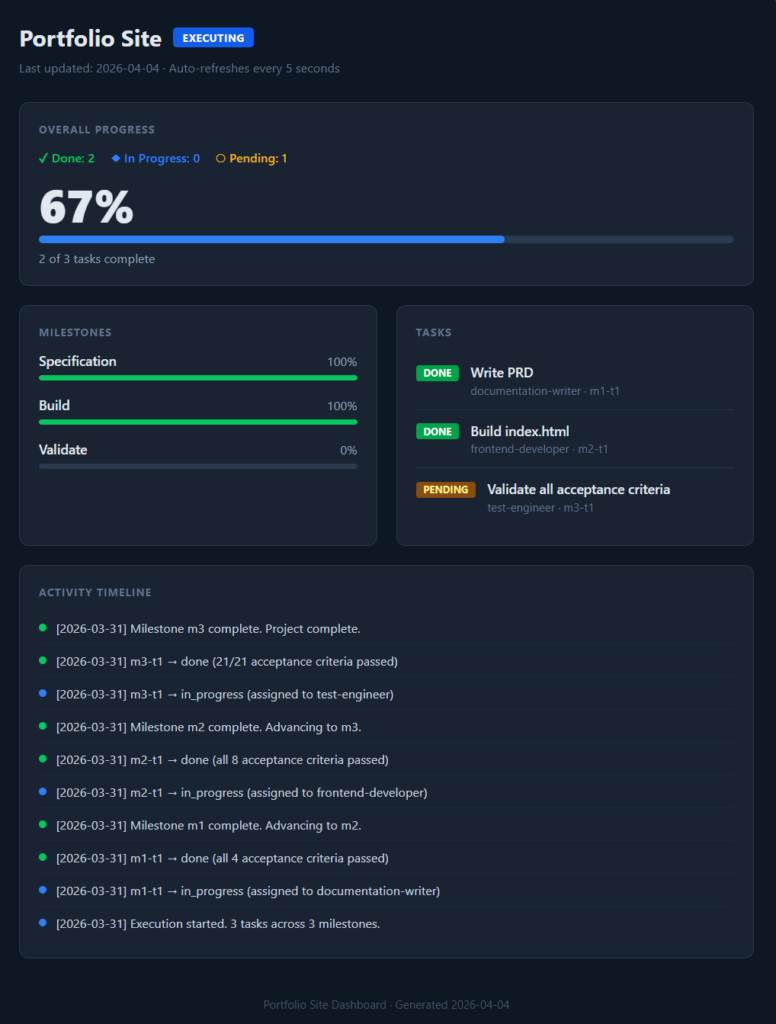
A self-contained HTML file that reads task state from disk. Milestone progress, task status, activity timeline — auto-refreshes every 5 seconds.
Anthropic’s Claude Code documentation — official reference for skills, agents, and orchestration architecture
Agents Added By Stack
Four agents ship with every project. Additional specialists are added based on what you’re building.
| SIGNAL | AGENT |
|---|---|
| Every project | orchestrator mandatory |
| Every project | problem-solver mandatory |
| Every project | test-engineer mandatory |
| Every project | documentation-writer mandatory |
| Full-stack framework | fullstack-developer |
| Separate frontend + backend | frontend-developer + backend-developer |
| Payments / billing | payments-engineer |
| Auth / OAuth / compliance | auth-security-engineer |
| Real-time / WebSockets | streaming-engineer |
| ML / AI features | ml-engineer |
| Mobile app | mobile-developer |
| Client design system | design-system-integrator |
| Deployment / CI/CD | devops-engineer |
| Client project / sensitive code | code-reviewer |
The builder reads your project description and selects the right agents. You can add, remove, or modify any of them after generation.
Who This Is For
This skill is built for developers who use Claude Code on projects with enough complexity that a single agent session isn’t enough.
You’ll get the most value if:
- Your project spans multiple layers — frontend, backend, database, infrastructure
- You’re spending time each session re-explaining context to Claude Code
- You want autonomous execution with quality gates, not fire-and-forget
- You’ve tried multi-agent setups manually and found them fragile or slow to configure
You probably don’t need this if:
- You’re working on a single-file script or a small utility
- Your project doesn’t require persistent context between sessions
- You prefer to coordinate agents yourself each session
The skill scales to the project. A three-agent setup for a small API is as valid as a ten-agent setup for a full platform build.
Getting Started
Install the skill, describe your project, and the orchestrator handles the rest
Source code, installation guide and example output are on GitHub.
FAQ
Key Takeaways
- A Claude Code multi-agent skill generates a complete agent team from a project description — orchestrator, specialists, self-healing pipeline, and persistent context
- Four mandatory agents ship with every build: orchestrator, problem-solver, test engineer, and documentation writer. Additional specialists are added based on your stack
- State reconciliation and self-healing mean interrupted sessions resume cleanly and failed tasks don’t halt progress
- Everything is plain markdown in your repo — no external dependencies, no lock-in
- Install, describe your project, and start building. Full source on GitHub